

Introduction to Classes and Objects
Creating a Class
The first step in creating a class is giving it a name. In this notebook, we will create two classes: Circle and Rectangle. We need to determine all the data that make up that class, which we call attributes. Think about this step as creating a blue print that we will use to create objects. In figure 1 we see two classes, Circle and Rectangle. Each has their attributes, which are variables. The class Circle has the attribute radius and color, while the Rectangle class has the attribute height and width. Let’s use the visual examples of these shapes before we get to the code, as this will help you get accustomed to the vocabulary.
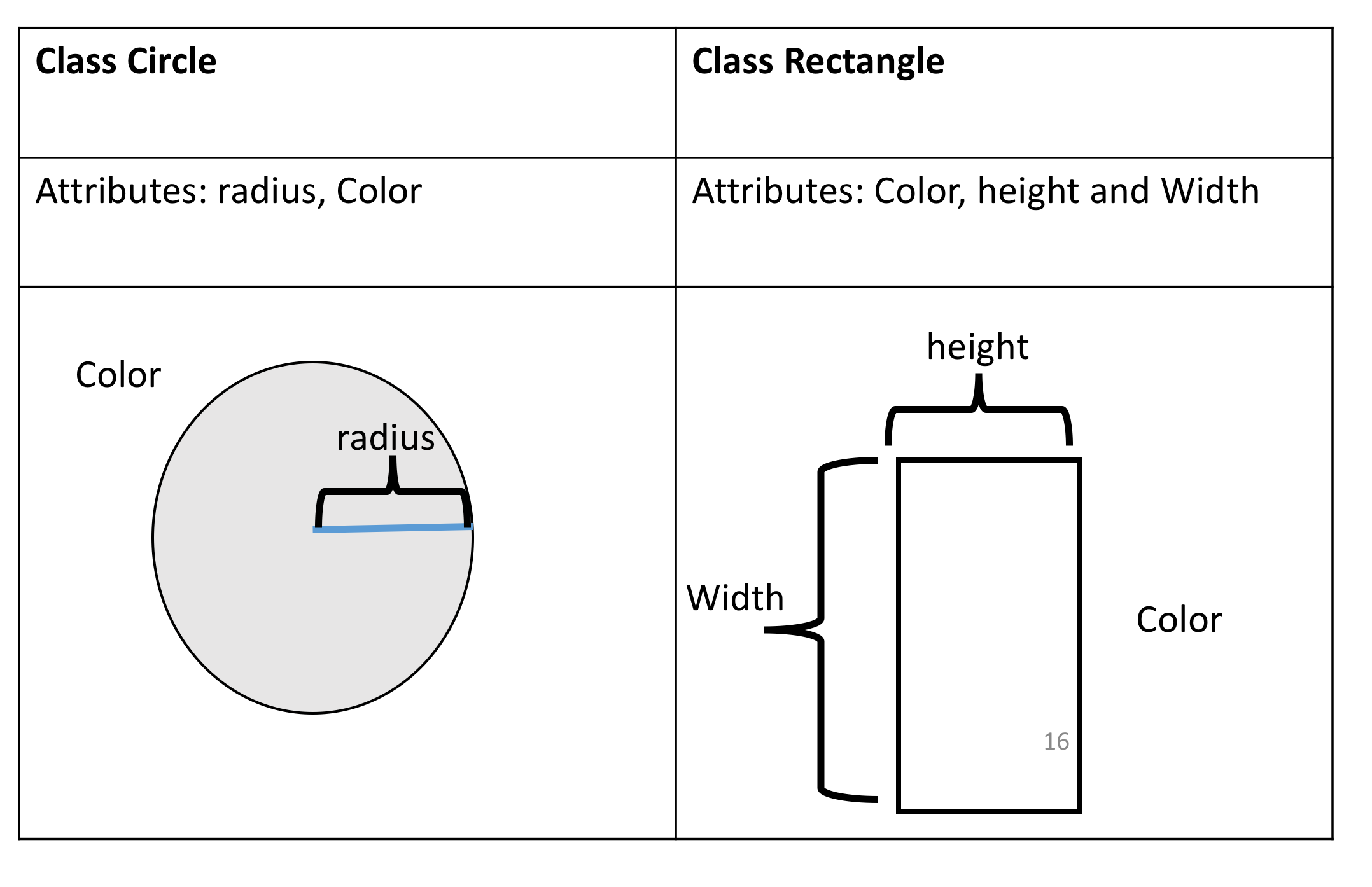
Figure 1: Classes circle and rectangle, and each has their own attributes. The class Circle has the attribute radius and colour, the class Rectangle has the attributes height and width.
Instances of a Class: Objects and Attributes
An instance of an object is the realisation of a class, and in Figure 2 we see three instances of the class circle. We give each object a name: red circle, yellow circle, and green circle. Each object has different attributes, so let's focus on the color attribute for each object.
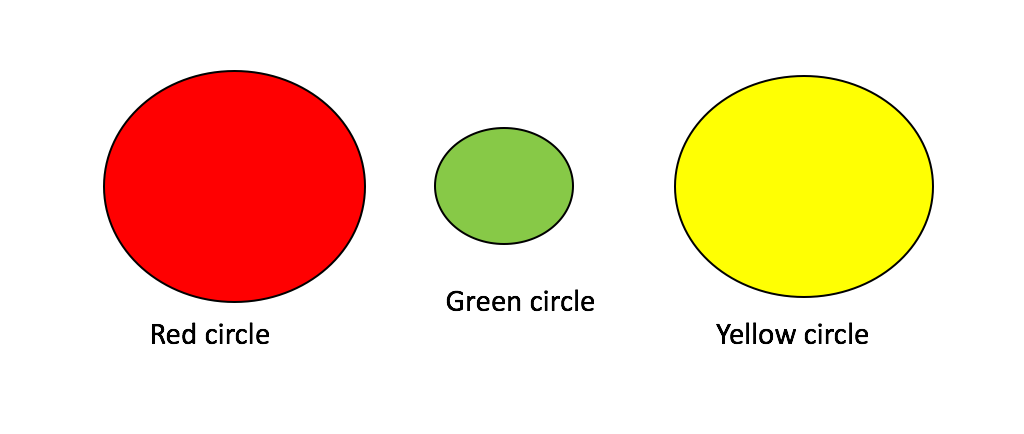
Figure 2: Three instances of the class Circle, or three objects of type Circle.
The colour attribute for the red Circle is the colour red, for the green Circle object the colour attribute is green, and for the yellow Circle the colour attribute is yellow.
Methods
Methods give you a way to change or interact with the object; they are functions that interact with objects. For example, let’s say we would like to increase the radius of a circle by a specified amount. We can create a method called add_radius(r) that increases the radius by r. This is shown in figure 3, where after applying the method to the "orange circle object", the radius of the object increases accordingly. The “dot” notation means to apply the method to the object, which is essentially applying a function to the information in the object.
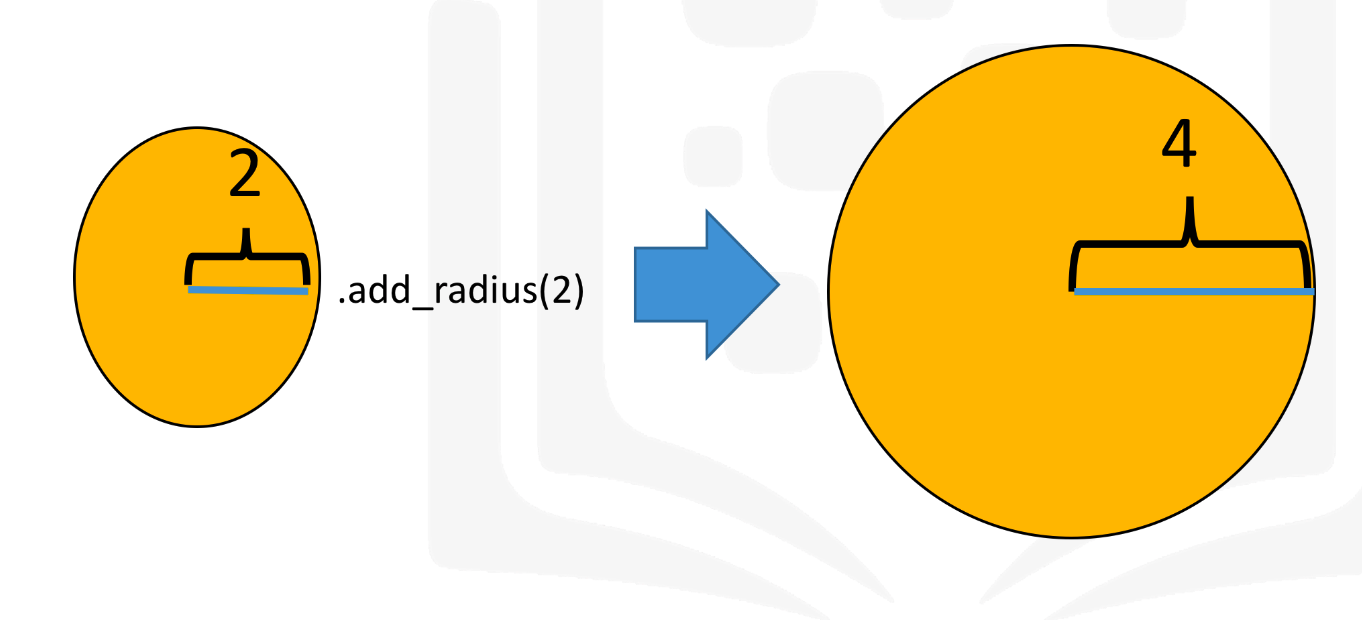
Figure 3: Applying the method “add_radius” to the object orange circle object.
Creating a Class
Now we are going to create a class Circle, but first, we are going to import a library to draw the objects:
# Import the library

import matplotlib.pyplot as plt
%matplotlib inline
The first step in creating your own class is to use the class keyword, then the name of the class as shown in Figure 4. In this course the class parent will always be object:
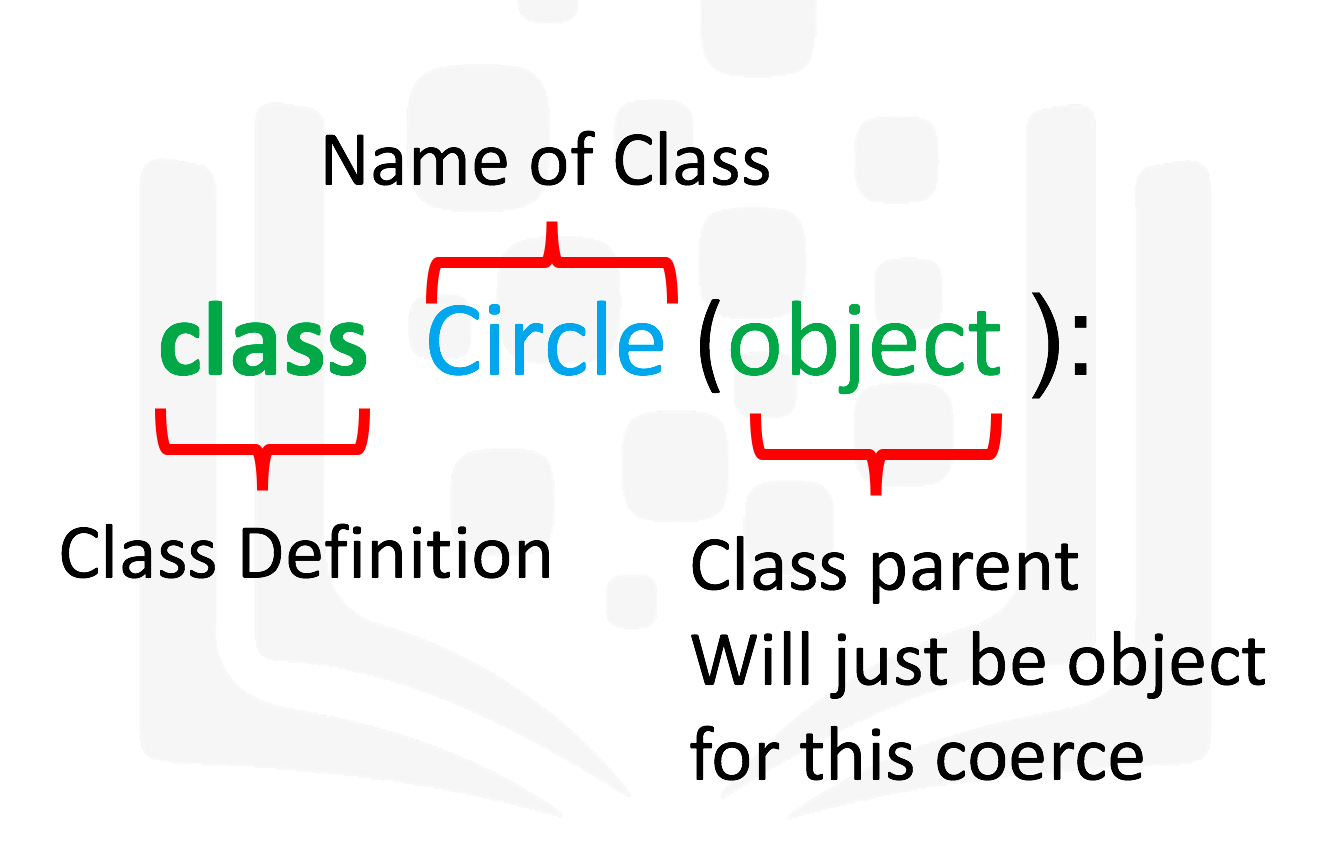
Figure 4: Creating a class Circle.
The next step is a special method called a constructor __init__, which is used to initialize the object. The inputs are data attributes. The term self contains all the attributes in the set. For example the self.color gives the value of the attribute color and self.radius will give you the radius of the object. We also have the method add_radius() with the parameter r, the method adds the value of r to the attribute radius. To access the radius we use the syntax self.radius. The labeled syntax is summarized in Figure 5:
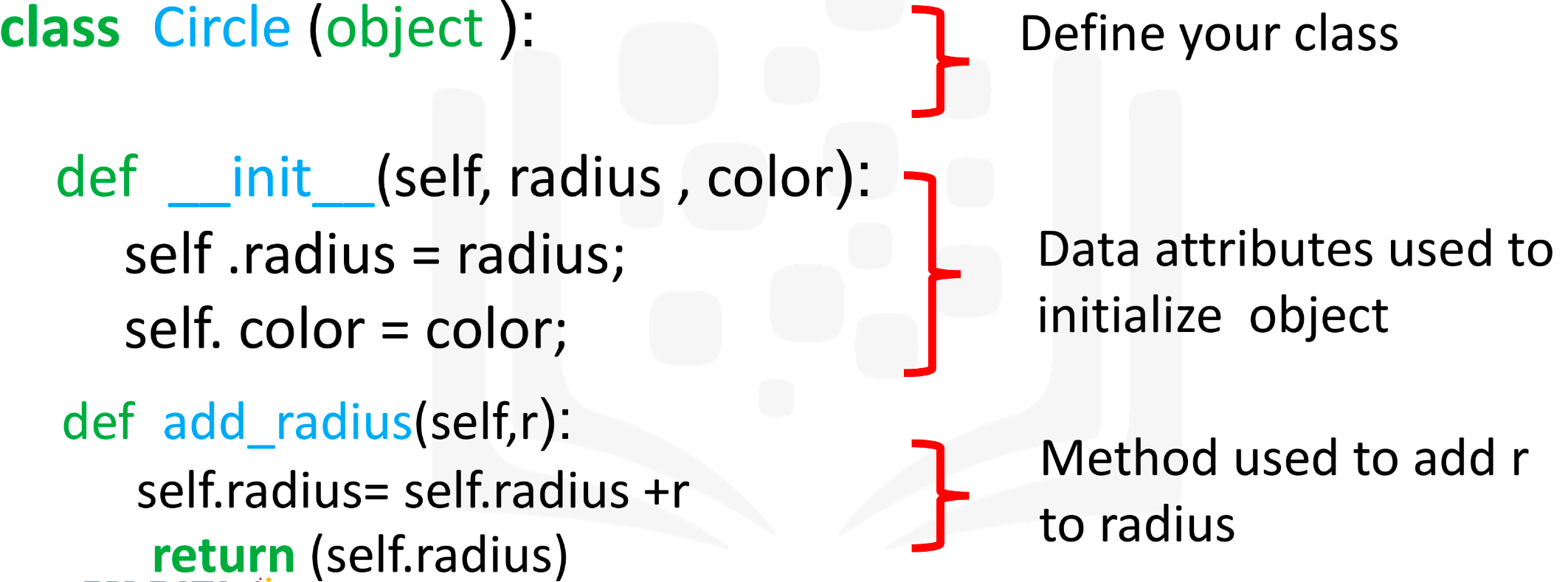
Figure 5: Labeled syntax of the object circle.
The actual object is shown below. We include the method drawCircle to display the image of a circle. We set the default radius to 3 and the default colour to blue:
# Create a class Circle

class Circle(object):

    # Constructor
    def __init__(self, radius=3, color='blue'):
        self.radius = radius
        self.color = color

    # Method
    def add_radius(self, r):
        self.radius = self.radius + r
        return(self.radius)

    # Method
    def drawCircle(self):
        plt.gca().add_patch(plt.Circle((0, 0), radius=self.radius, fc=self.color))
        plt.axis('scaled')
        plt.show()
Creating an instance of a class Circle
Let’s create the object RedCircle of type Circle to do the following:
# Create an object RedCircle

RedCircle = Circle(10, 'red')
We can use the dir command to get a list of the object's methods. Many of them are default Python methods.
# Find out the methods can be used on the object RedCircle

dir(RedCircle)
['__class__',
 '__delattr__',
 '__dict__',
 '__dir__',
 '__doc__',
 '__eq__',
 '__format__',
 '__ge__',
 '__getattribute__',
 '__gt__',
 '__hash__',
 '__init__',
 '__init_subclass__',
 '__le__',
 '__lt__',
 '__module__',
 '__ne__',
 '__new__',
 '__reduce__',
 '__reduce_ex__',
 '__repr__',
 '__setattr__',
 '__sizeof__',
 '__str__',
 '__subclasshook__',
 '__weakref__',
 'add_radius',
 'color',
 'drawCircle',
 'radius']
We can look at the data attributes of the object:
# Print the object attribute radius

RedCircle.radius
10
# Print the object attribute color

RedCircle.color
'red'
We can change the object's data attributes:
# Set the object attribute radius

RedCircle.radius = 1
RedCircle.radius
1
We can draw the object by using the method drawCircle():
# Call the method drawCircle

RedCircle.drawCircle()

<Figure size 432x288 with 0 Axes>
We can increase the radius of the circle by applying the method add_radius(). Let's increases the radius by 2 and then by 5:
# Use method to change the object attribute radius

print('Radius of object:',RedCircle.radius)
RedCircle.add_radius(2)
print('Radius of object of after applying the method add_radius(2):',RedCircle.radius)
RedCircle.add_radius(5)
print('Radius of object of after applying the method add_radius(5):',RedCircle.radius)
Radius of object: 1
Radius of object of after applying the method add_radius(2): 3
Radius of object of after applying the method add_radius(5): 8
Let’s create a blue circle. As the default colour is blue, all we have to do is specify what the radius is:
# Create a blue circle with a given radius

BlueCircle = Circle(radius=100)
As before, we can access the attributes of the instance of the class by using the dot notation:
# Print the object attribute radius

BlueCircle.radius
100
# Print the object attribute color

BlueCircle.color
'blue'
We can draw the object by using the method drawCircle():
# Call the method drawCircle

BlueCircle.drawCircle()

<Figure size 432x288 with 0 Axes>
Compare the x and y axis of the figure to the figure for RedCircle; they are different.
The Rectangle Class
Let's create a class rectangle with the attributes of height, width, and color. We will only add the method to draw the rectangle object:
# Create a new Rectangle class for creating a rectangle object

class Rectangle(object):

    # Constructor
    def __init__(self, width=2, height=3, color='r'):
        self.height = height
        self.width = width
        self.color = color

    # Method
    def drawRectangle(self):
        plt.gca().add_patch(plt.Rectangle((0, 0), self.width, self.height ,fc=self.color))
        plt.axis('scaled')
        plt.show()
Let’s create the object SkinnyBlueRectangle of type Rectangle. Its width will be 2 and height will be 3, and the color will be blue:
# Create a new object rectangle

SkinnyBlueRectangle = Rectangle(2, 3, 'blue')
As before we can access the attributes of the instance of the class by using the dot notation:
# Print the object attribute height

SkinnyBlueRectangle.height
3
# Print the object attribute width

SkinnyBlueRectangle.width
2
# Print the object attribute color

SkinnyBlueRectangle.color
'blue'
We can draw the object:
# Use the drawRectangle method to draw the shape

SkinnyBlueRectangle.drawRectangle()

<Figure size 432x288 with 0 Axes>
Let’s create the object FatYellowRectangle of type Rectangle:
# Create a new object rectangle

FatYellowRectangle = Rectangle(20, 5, 'yellow')
We can access the attributes of the instance of the class by using the dot notation:
# Print the object attribute height

FatYellowRectangle.height
5
# Print the object attribute width

FatYellowRectangle.width
20
# Print the object attribute color

FatYellowRectangle.color
'yellow'
We can draw the object:
# Use the drawRectangle method to draw the shape

FatYellowRectangle.drawRectangle()

<Figure size 432x288 with 0 Axes>
Exercises
Text Analysis
You have been recruited by your friend, a linguistics enthusiast, to create a utility tool that can perform analysis on a given piece of text. Complete the class 'analysedText' with the following methods -
- Constructor (__init__) - This method should take the argument
text, make it lower case, and remove all punctuation. Assume only the following punctuation is used: period (.), exclamation mark (!), comma (,) and question mark (?). Assign this newly formatted text to a new attribute calledfmtText. - freqAll - This method should create and return dictionary of all unique words in the text, along with the number of times they occur in the text. Each key in the dictionary should be the unique word appearing in the text and the associated value should be the number of times it occurs in the text. Create this dictionary from the
fmtTextattribute. - freqOf - This method should take a word as an argument and return the number of occurrences of that word in
fmtText.
Hint: Some useful functions are
replace(), lower(), split(), count() Hint for implementing Constructor
The lower() function converts all characters in the string to lowercase.
The replace() function takes two arguments: the text to search for and the text to replace it with. Try calling this function for each punctuation you want to remove and replace it with a blank character, ''
You can define a class attribute and assign it a value with the following generic recipe: self.attribute_name = value
Hint for implementing freqAll
You can create a list of all words in fmtText using the split() and by using the whitespace character, ' ' as the delimiter.
Using set() with a list as the argument will return a set with all the unique elements in the list. Try iterating over the elements in this set to create the keys for a dictionary. The count() function will return the number of occurrences of the argument in list. For example, ["hi", "hi", "hello"].count("hi") will return 2. This can be used to set the values for each key-value pair in the dictionary.
Hint for implementing freqOf
Try calling the freqAll method you implemented above and assign it to a variable. You will now have a dictionary with the unique words that appear in fmtText as the keys, and the number of times they appear as the value.
You can use this dictionary to return the number of occurrences of the word that was given as an argument to the freqOf method.
If the word given as an argument does not appear in the text, return 0. You can check if a string is a key in the dictionary using the following code recipe: if item in my_dictionary:
class analysedText(object):

    def __init__ (self, text):
        self.new_str = ''
        self.fmtText = ''
        i = 0
        self.punc_marks = (',', '.', '!', '?')
        # TODO: Remove the punctuation from <text> and make it lower case.
        self.text    = text.lower()
        # # self.new_str = self.text[0]
        # while(i < len(self.text)):
        #     if self.text[i] in self.punc_marks:
        #         self.new_str += str(self.text.replace((',', '.', '!', '?') , ''))
        #     print(self.text[i])
        #     # TODO: Assign the formatted text to a new attribute called "fmtText"
        #     # copy by reference
        for idx in range(len(self.text)):
            for j in range(len(self.punc_marks)):
                if self.text[idx] == self.punc_marks[j]:
                    self.new_str += self.text.replace(self.punc_marks[j], '')


        self.fmtText = self.new_str
            # i = i + 1
        print(len(self.text))
        print(text)
        print(self.new_str )
        print(self.fmtText)

    def freqAll(self):

        # TODO: Split the text into a list of words
        self.fmtText = [x for x in self.fmtText.split()]

        # TODO: Create a dictionary with the unique words in the text as keys
        # and the number of times they occur in the text as values
        self.dic = {w:i for i, w in enumerate(fmtText)}
        # return the created dictionary
        return dic

    def freqOf(self, word):
        ocur = 0
        # TODO: return the number of occurrences of <word> in <fmtText>
        for w in self.fmtText:
            if w == word:
                ocur +=1
        print(ocur)
        return ocur

# client test
AD = analysedText('Afon!?a')
AD
7
Afon!?a
afon?aafon!a
afon?aafon!a
<__main__.analysedText at 0x393da40>
You can run the code cell below to test your functions to ensure they are working correctly. First execute the code cell in which you implemented your solution, then execute the code cell to test your implementation.
import sys

sampleMap = {'eirmod': 1,'sed': 1, 'amet': 2, 'diam': 5, 'consetetur': 1, 'labore': 1, 'tempor': 1, 'dolor': 1, 'magna': 2, 'et': 3, 'nonumy': 1, 'ipsum': 1, 'lorem': 2}

def testMsg(passed):
    if passed:
       return 'Test Passed'
    else :
       return 'Test Failed'

print("Constructor: ")
try:
    samplePassage = analysedText("Lorem ipsum dolor! diam amet, consetetur Lorem magna. sed diam nonumy eirmod tempor. diam et labore? et diam magna. et diam amet.")
    print(testMsg(samplePassage.fmtText == "lorem ipsum dolor diam amet consetetur lorem magna sed diam nonumy eirmod tempor diam et labore et diam magna et diam amet"))
except:
    print("Error detected. Recheck your function " )
print("freqAll: ")
try:
    wordMap = samplePassage.freqAll()
    print(testMsg(wordMap==sampleMap))
except:
    print("Error detected. Recheck your function " )
print("freqOf: ")
try:
    passed = True
    for word in sampleMap:
        if samplePassage.freqOf(word) != sampleMap[word]:
            passed = False
            break
    print(testMsg(passed))

except:
    print("Error detected. Recheck your function  " )
Constructor:
Error detected. Recheck your function
freqAll:
Error detected. Recheck your function
freqOf:
Error detected. Recheck your function
Click here for the solution
class analysedText(object):

    def __init__ (self, text):
        # remove punctuation
        formattedText = text.replace('.','').replace('!','').replace('?','').replace(',','')

        # make text lowercase
        formattedText = formattedText.lower()

        self.fmtText = formattedText

    def freqAll(self):
        # split text into words
        wordList = self.fmtText.split(' ')

        # Create dictionary
        freqMap = {}
        for word in set(wordList): # use set to remove duplicates in list
            freqMap[word] = wordList.count(word)

        return freqMap

    def freqOf(self,word):
        # get frequency map
        freqDict = self.freqAll()

        if word in freqDict:
            return freqDict[word]
        else:
            return 0
The last exercise!
Congratulations, you have completed your first lesson and hands-on lab in Python.