

Create a Python List as follows:
# Create a python list

a = ["0", 1, "two", "3", 4]
We can access the data via an index:
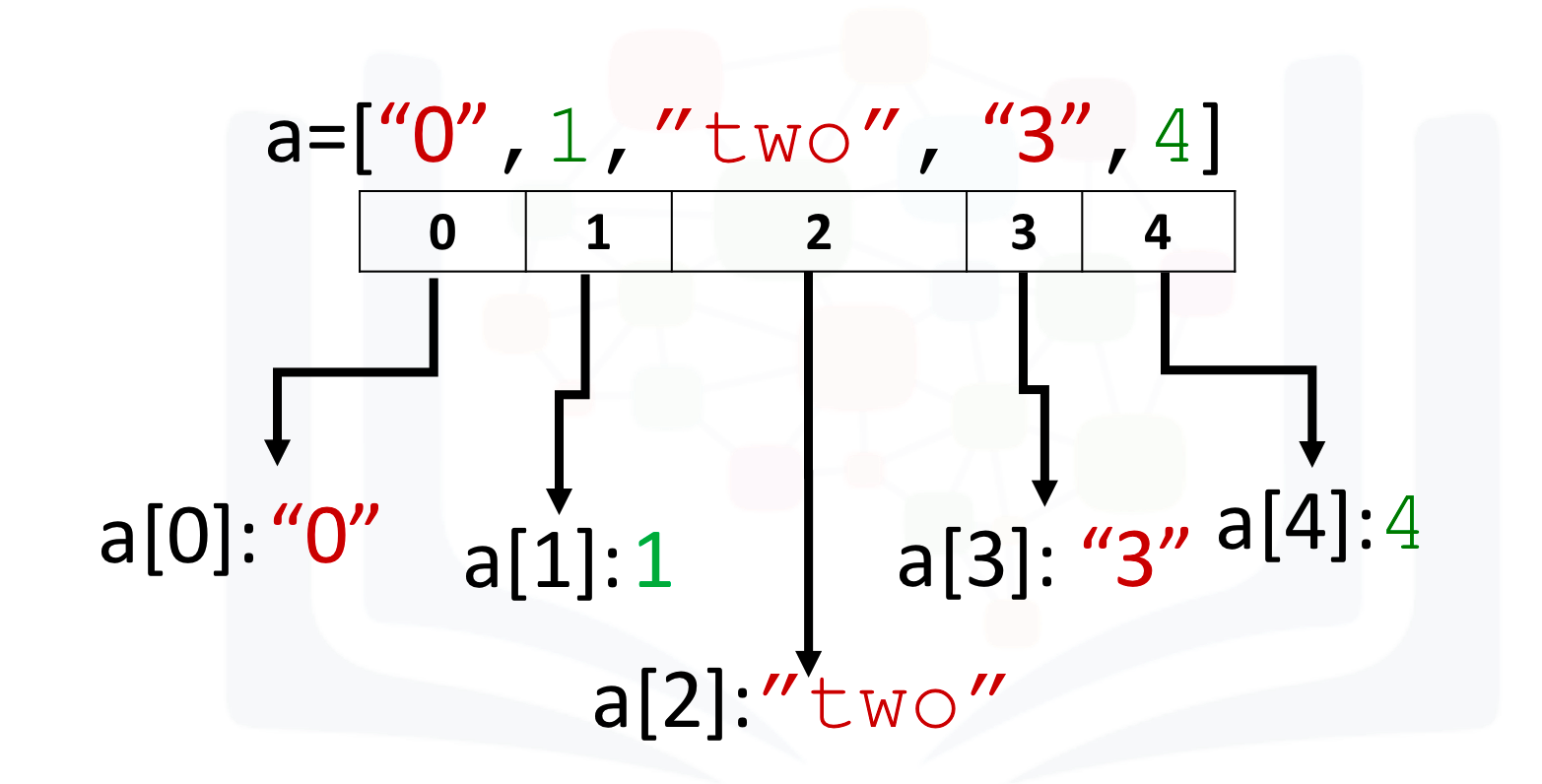
We can access each element using a square bracket as follows:
# Print each element

print("a[0]:", a[0])
print("a[1]:", a[1])
print("a[2]:", a[2])
print("a[3]:", a[3])
print("a[4]:", a[4])
a[0]: 0
a[1]: 1
a[2]: two
a[3]: 3
a[4]: 4
What is Numpy?
NumPy is a Python library used for working with arrays, linear algebra, fourier transform, and matrices.A numpy array is similar to a list. NumPy stands for Numerical Python and it is an open source project.The array object in NumPy is called ndarray, it provides a lot of supporting functions that make working with ndarray very easy.
Arrays are very frequently used in data science, where speed and resources are very important.
NumPy is usually imported under the np alias.
It's usually fixed in size and each element is of the same type. We can cast a list to a numpy array by first importing numpy:
# import numpy library

import numpy as np
We then cast the list as follows:
# Create a numpy array

a = np.array([0, 1, 2, 3, 4])
a
array([0, 1, 2, 3, 4])
Each element is of the same type, in this case integers:
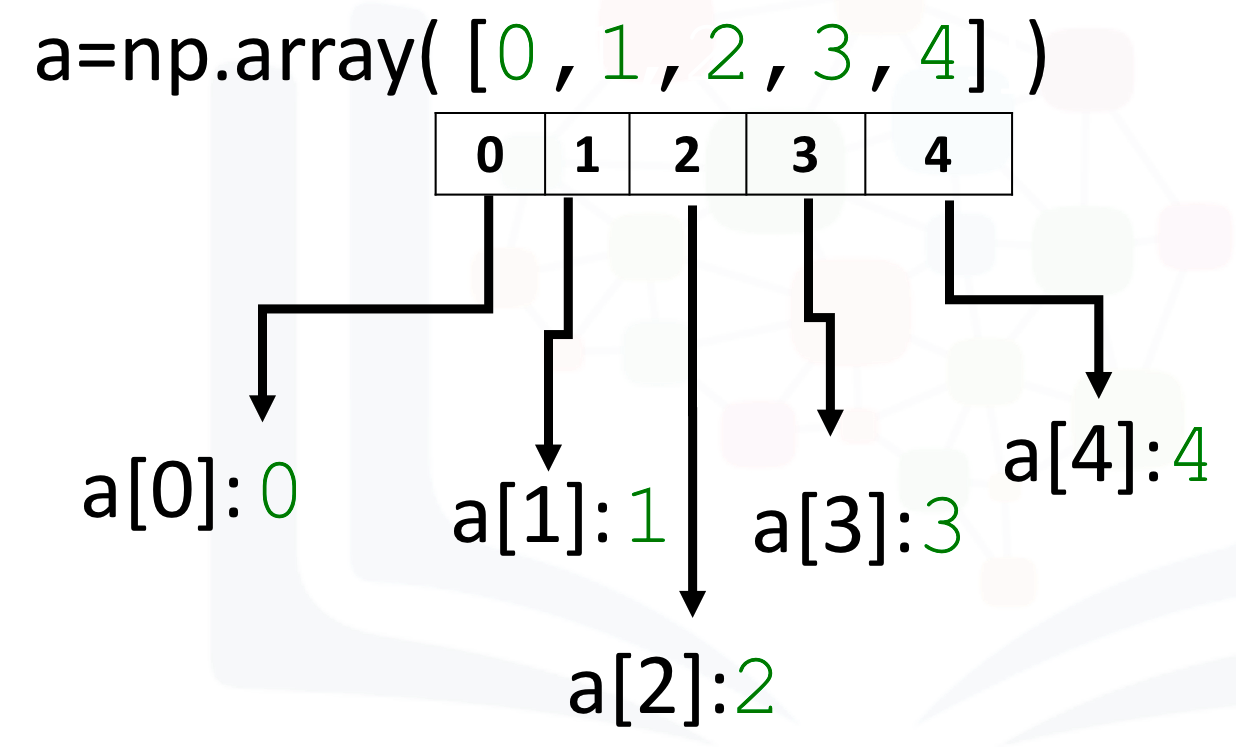
As with lists, we can access each element via a square bracket:
# Print each element

print("a[0]:", a[0])
print("a[1]:", a[1])
print("a[2]:", a[2])
print("a[3]:", a[3])
print("a[4]:", a[4])
a[0]: 0
a[1]: 1
a[2]: 2
a[3]: 3
a[4]: 4
Checking NumPy Version
The version string is stored under version attribute.
print(np.__version__)
1.21.4
Type
If we check the type of the array we get numpy.ndarray:
# Check the type of the array

type(a)
numpy.ndarray
As numpy arrays contain data of the same type, we can use the attribute "dtype" to obtain the data type of the array’s elements. In this case, it's a 64-bit integer:
# Check the type of the values stored in numpy array

a.dtype
dtype('int32')
Try it yourself
Check the type of the array and Value type for the given array c
b = np.array([3.1, 11.02, 6.2, 213.2, 5.2])

# Enter your code here
Click here for the solution
type(b)

b.dtype

If we examine the attribute dtype we see float 64, as the elements are not integers:
Assign value
We can change the value of the array. Consider the array c:
# Create numpy array

c = np.array([20, 1, 2, 3, 4])
c
array([20, 1, 2, 3, 4])
We can change the first element of the array to 100 as follows:
# Assign the first element to 100

c[0] = 100
c
array([100, 1, 2, 3, 4])
We can change the 5th element of the array to 0 as follows:
# Assign the 5th element to 0

c[4] = 0
c
array([100, 1, 2, 3, 0])
Try it yourself
Assign the value 20 for the second element in the given array.
a = np.array([10, 2, 30, 40,50])

# Enter your code here
Click here for the solution
a[1]=20
a
Slicing
Like lists, we can slice the numpy array. Slicing in python means taking the elements from the given index to another given index.
We pass slice like this: [start:end].
We can select the elements from 1 to 3 and assign it to a new numpy array d as follows:
# Slicing the numpy array

d = c[1:4]
d
array([1, 2, 3])
We can assign the corresponding indexes to new values as follows:
# Set the fourth element and fifth element to 300 and 400

c[3:5] = 300, 400
c
array([100, 1, 2, 300, 400])
We can also define the steps in slicing, like this: [start:end:step].
arr = np.array([1, 2, 3, 4, 5, 6, 7])

print(arr[1:7:2])
[2 4 6]
If we don't pass start its considered 0
print(arr[:4])
[1 2 3 4]
If we don't pass end it considers till the length of array.
print(arr[4:])
[5 6 7]
If we don't pass step its considered 1
print(arr[1:5:])
[2 3 4 5]
Try it yourself
Print the even elements in the given array.
arr = np.array([1, 2, 3, 4, 5, 6, 7, 8])

# Enter your code here
print(arr[0:6:2])
[1 3 5]
Click here for the solution
print(arr[1:8:2])
Assign Value with List
Similarly, we can use a list to select more than one specific index.
The list select contains several values:
# Create the index list

select = [0, 2, 3, 4]
select
[0, 2, 3, 4]
We can use the list as an argument in the brackets. The output is the elements corresponding to the particular indexes:
# Use List to select elements

d = c[select]
d
array([100000, 100000, 100000, 100000])
We can assign the specified elements to a new value. For example, we can assign the values to 100 000 as follows:
# Assign the specified elements to new value

c[select] = 100000
c
array([100000, 1, 100000, 100000, 100000])
Other Attributes
Let's review some basic array attributes using the array a:
# Create a numpy array

a = np.array([0, 1, 2, 3, 4])
a
array([0, 1, 2, 3, 4])
The attribute size is the number of elements in the array:
# Get the size of numpy array

a.size
5
The next two attributes will make more sense when we get to higher dimensions but let's review them. The attribute ndim represents the number of array dimensions, or the rank of the array. In this case, one:
# Get the number of dimensions of numpy array

a.ndim
1
The attribute shape is a tuple of integers indicating the size of the array in each dimension:
# Get the shape/size of numpy array

a.shape
(5,)
Try it yourself
Find the size ,dimension and shape for the given array b
b = np.array([10, 20, 30, 40, 50, 60, 70])

# Enter your code here
b.size
b.ndim
b.shape
(7,)
Click here for the solution
b.size

b.ndim

b.shape
Numpy Statistical Functions
# Create a numpy array

a = np.array([1, -1, 1, -1])
a
array([ 1, -1, 1, -1])
# Get the mean of numpy array

mean = a.mean()
mean
0.0
# Get the standard deviation of numpy array

standard_deviation=a.std()
standard_deviation
1.0
# Create a numpy array

b = np.array([-1, 2, 3, 4, 5])
b
array([-1, 2, 3, 4, 5])
# Get the biggest value in the numpy array

max_b = b.max()
max_b
5
# Get the smallest value in the numpy array

min_b = b.min()
min_b
-1
Try it yourself
Find the sum of maximum and minimum value in the given numpy array
c = np.array([-10, 201, 43, 94, 502])

# Enter your code here
max_c = c.max()
max_c

min_c = c.min()
min_c


Sum = (max_c +min_c)
Sum
492
Click here for the solution
max_c = c.max()
max_c

min_c = c.min()
min_c


Sum = (max_c +min_c)
Sum
Numpy Array Operations
You could use arithmetic operators directly between NumPy arrays
Array Addition
Consider the numpy array u:
u = np.array([1, 0])
u.ndim
1
Consider the numpy array v:
v = np.array([0, 1])
v
array([0, 1])
We can add the two arrays and assign it to z:
# Numpy Array Addition

z = np.add(u, v)
z
array([1, 1])
The operation is equivalent to vector addition:
# Plotting functions


import time
import sys
import numpy as np

import matplotlib.pyplot as plt
%matplotlib inline

def Plotvec1(u, z, v):

    ax = plt.axes() # to generate the full window axes
    ax.arrow(0, 0, *u, head_width=0.05, color='r', head_length=0.1)# Add an arrow to the  U Axes with arrow head width 0.05, color red and arrow head length 0.1
    plt.text(*(u + 0.1), 'u')#Adds the text u to the Axes

    ax.arrow(0, 0, *v, head_width=0.05, color='b', head_length=0.1)# Add an arrow to the  v Axes with arrow head width 0.05, color red and arrow head length 0.1
    plt.text(*(v + 0.1), 'v')#Adds the text v to the Axes

    ax.arrow(0, 0, *z, head_width=0.05, head_length=0.1)
    plt.text(*(z + 0.1), 'z')#Adds the text z to the Axes
    plt.ylim(-2, 2)#set the ylim to bottom(-2), top(2)
    plt.xlim(-2, 2)#set the xlim to left(-2), right(2)
# Plot numpy arrays

Plotvec1(u, z, v)

Try it yourself
Perform addition operation on the given numpy array arr1 and arr2:
arr1 = np.array([10, 11, 12, 13, 14, 15])
arr2 = np.array([20, 21, 22, 23, 24, 25])

# Enter your code here
arr3 = np.add(arr1, arr2)
arr3
array([30, 32, 34, 36, 38, 40])
Click here for the solution
arr3 = np.add(arr1, arr2)
arr3
Array Subtraction
Consider the numpy array a:
a = np.array([10, 20, 30])
a
array([10, 20, 30])
Consider the numpy array b:
b = np.array([5, 10, 15])
b
array([ 5, 10, 15])
We can subtract the two arrays and assign it to c:
c = np.subtract(a, b)

print(c)
[ 5 10 15]
Try it yourself
Perform subtraction operation on the given numpy array arr1 and arr2:
arr1 = np.array([10, 20, 30, 40, 50, 60])
arr2 = np.array([20, 21, 22, 23, 24, 25])

# Enter your code here
np.subtract(arr1, arr2)
array([-10, -1, 8, 17, 26, 35])
Click here for the solution
arr3 = np.subtract(arr1, arr2)
arr3
Array Multiplication
Consider the vector numpy array y:
# Create a numpy array

x = np.array([1, 2])
x
array([1, 2])
# Create a numpy array

y = np.array([2, 1])
y
array([2, 1])
We can multiply every element in the array by 2:
# Numpy Array Multiplication

z = np.multiply(x, y)
z
array([2, 2])
This is equivalent to multiplying a vector by a scaler:
Try it yourself
Perform multiply operation on the given numpy array arr1 and arr2:
arr1 = np.array([10, 20, 30, 40, 50, 60])
arr2 = np.array([2, 1, 2, 3, 4, 5])

# Enter your code here
np.multiply(arr1, arr2)
array([ 20, 20, 60, 120, 200, 300])
Click here for the solution
arr3 = np.multiply(arr1, arr2)
arr3
Array Division
Consider the vector numpy array a:
a = np.array([10, 20, 30])
a
array([10, 20, 30])
Consider the vector numpy array b:
b = np.array([2, 10, 5])
b
array([ 2, 10, 5])
We can divide the two arrays and assign it to c:
c = np.divide(a, b)
c
array([5., 2., 6.])
Try it yourself
Perform division operation on the given numpy array arr1 and arr2:
arr1 = np.array([10, 20, 30, 40, 50, 60])
arr2 = np.array([3, 5, 10, 8, 2, 33])

# Enter your code here
np.divide(arr1, arr2)
array([ 3.33333333,  4.        ,  3.        ,  5.        , 25.        ,
        1.81818182])
Click here for the solution
arr3 = np.divide(arr1, arr2)
arr3
Dot Product
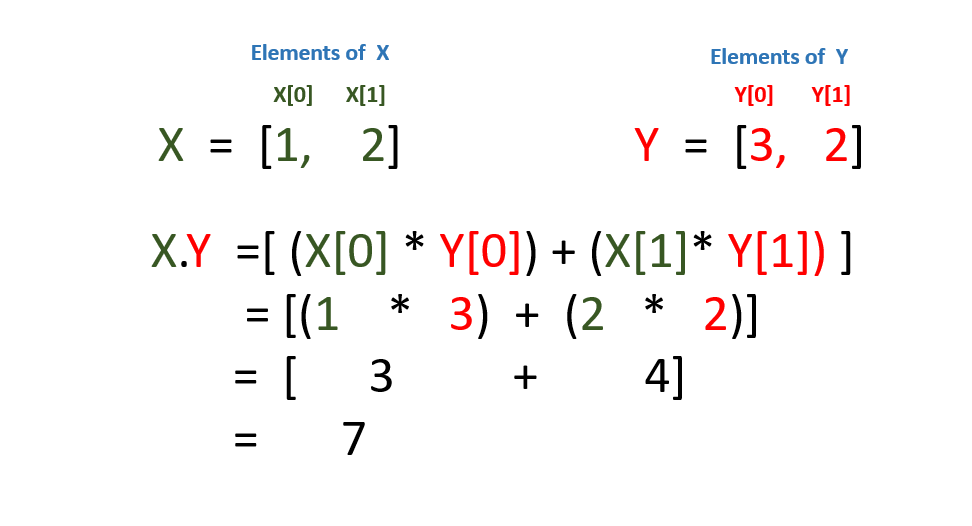
The dot product of the two numpy arrays u and v is given by:
X = np.array([1, 2])
Y = np.array([3, 2])
# Calculate the dot product

np.dot(X, Y)
7
#Elements of X
print(X[0])
print(X[1])
1
2
#Elements of Y
print(Y[0])
print(Y[1])
3
2
We are performing the dot product which is shown as below
Try it yourself
Perform dot operation on the given numpy array ar1 and ar2:
arr1 = np.array([3, 5])
arr2 = np.array([2, 4])

# Enter your code here
np.dot(arr1, arr2)
26
Click here for the solution
arr3 = np.dot(arr1, arr2)
arr3
Adding Constant to a Numpy Array
Consider the following array:
# Create a constant to numpy array

u = np.array([1, 2, 3, -1])
u
array([ 1, 2, 3, -1])
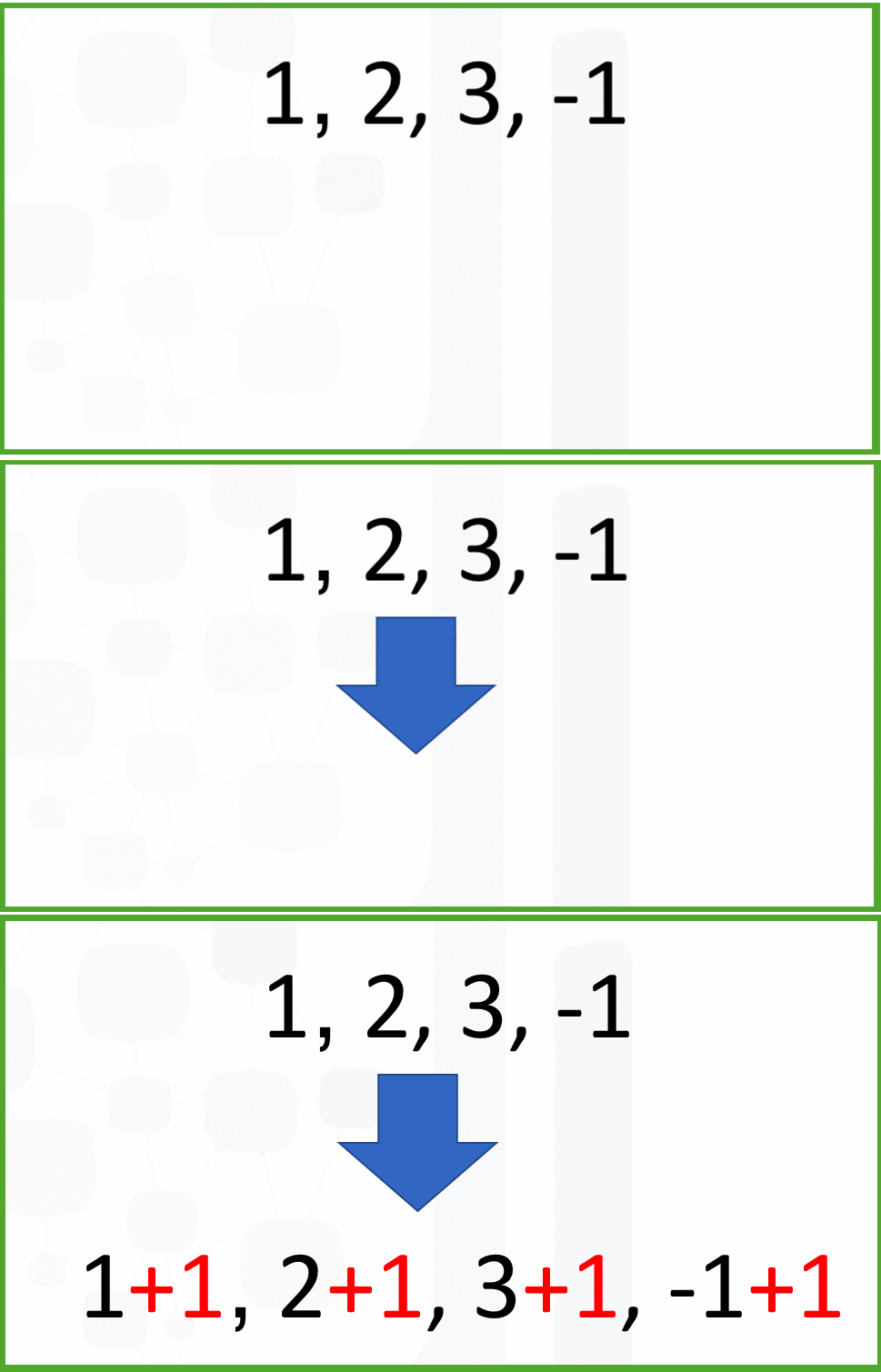
Adding the constant 1 to each element in the array:
# Add the constant to array

u + 1
array([2, 3, 4, 0])
The process is summarised in the following animation:
Try it yourself
Add Constant 5 to the given numpy array ar:
arr = np.array([1, 2, 3, -1])

# Enter your code here
arr + 5
array([6, 7, 8, 4])
Click here for the solution
arr + 5
Mathematical Functions
We can access the value of pi in numpy as follows :
# The value of pi

np.pi
3.141592653589793
We can create the following numpy array in Radians:
# Create the numpy array in radians

x = np.array([0, np.pi/2 , np.pi])
We can apply the function sin to the array x and assign the values to the array y; this applies the sine function to each element in the array:
# Calculate the sin of each elements

y = np.sin(x)
y
array([0.0000000e+00, 1.0000000e+00, 1.2246468e-16])
Linspace
A useful function for plotting mathematical functions is linspace. Linspace returns evenly spaced numbers over a specified interval.
numpy.linspace(start, stop, num = int value)
start : start of interval range
stop : end of interval range
num : Number of samples to generate.
# Makeup a numpy array within [-2, 2] and 5 elements

np.linspace(-2, 2, num=5)
array([-2., -1., 0., 1., 2.])
If we change the parameter num to 9, we get 9 evenly spaced numbers over the interval from -2 to 2:
# Make a numpy array within [-2, 2] and 9 elements

np.linspace(-2, 2, num=9)
array([-2. , -1.5, -1. , -0.5, 0. , 0.5, 1. , 1.5, 2. ])
We can use the function linspace to generate 100 evenly spaced samples from the interval 0 to 2π:
# Make a numpy array within [0, 2π] and 100 elements

x = np.linspace(0, 2*np.pi, num=100)
We can apply the sine function to each element in the array x and assign it to the array y:
# Calculate the sine of x list

y = np.sin(x)
# Plot the result

plt.plot(x, y)
[<matplotlib.lines.Line2D at 0x3be63f8>]

Try it yourself
Make a numpy array within [5, 4] and 6 elements
# Enter your code here
x = np.linspace(5,4,10)
a=2
b=-1
y = a*x +b

plt.plot(x, y)
[<matplotlib.lines.Line2D at 0x3d6ec88>]

Click here for the solution
np.linspace(5, 4, num=6)
Iterating 1-D Arrays
Iterating means going through elements one by one.
If we iterate on a 1-D array it will go through each element one by one.
If we execute the numpy array, we get in the array format
arr1 = np.array([1, 2, 3])
print(arr1)
[1 2 3]
But if you want to result in the form of the list, then you can use for loop:
for x in arr1:
  print(x)
1
2
3
Quiz on 1D Numpy Array
Implement the following vector subtraction in numpy: u-v
# Write your code below and press Shift+Enter to execute

u = np.array([1, 0])
v = np.array([0, 1])

# np.subtract(u,v)
u-v
array([ 1, -1])
Click here for the solution
u - v
Multiply the numpy array z with -2:
# Write your code below and press Shift+Enter to execute

z = np.array([2, 4])
z*-2
array([-4, -8])
Click here for the solution
-2 * z
Consider the list [1, 2, 3, 4, 5] and [1, 0, 1, 0, 1]. Cast both lists to a numpy array then multiply them together:
# Write your code below and press Shift+Enter to execute
np.array([1, 2, 3, 4, 5]) * np.array([1, 0, 1, 0, 1])
array([1, 0, 3, 0, 5])
Click here for the solution
a = np.array([1, 2, 3, 4, 5])
b = np.array([1, 0, 1, 0, 1])
a * b
# Import the libraries

import time
import sys
import numpy as np

import matplotlib.pyplot as plt
%matplotlib inline

def Plotvec2(a,b):
    ax = plt.axes()# to generate the full window axes
    ax.arrow(0, 0, *a, head_width=0.05, color ='r', head_length=0.1)#Add an arrow to the  a Axes with arrow head width 0.05, color red and arrow head length 0.1
    plt.text(*(a + 0.1), 'a')
    ax.arrow(0, 0, *b, head_width=0.05, color ='b', head_length=0.1)#Add an arrow to the  b Axes with arrow head width 0.05, color blue and arrow head length 0.1
    plt.text(*(b + 0.1), 'b')
    plt.ylim(-2, 2)#set the ylim to bottom(-2), top(2)
    plt.xlim(-2, 2)#set the xlim to left(-2), right(2)
Convert the list [-1, 1] and [1, 1] to numpy arrays a and b. Then, plot the arrays as vectors using the fuction Plotvec2 and find their dot product:
# Write your code below and press Shift+Enter to execute
Plotvec2(np.array([-1, 1]), np.array([1, 1]))

Click here for the solution
a = np.array([-1, 1])
b = np.array([1, 1])
Plotvec2(a, b)
print("The dot product is", np.dot(a,b))
Convert the list [1, 0] and [0, 1] to numpy arrays a and b. Then, plot the arrays as vectors using the function Plotvec2 and find their dot product:
# Write your code below and press Shift+Enter to execute
a = np.array([1, 0])
b = np.array([0, 1])
Plotvec2(a, b)
print("The dot product is", np.dot(a, b))
The dot product is 0

Click here for the solution
a = np.array([1, 0])
b = np.array([0, 1])
Plotvec2(a, b)
print("The dot product is", np.dot(a, b))
Convert the list [1, 1] and [0, 1] to numpy arrays a and b. Then plot the arrays as vectors using the fuction Plotvec2 and find their dot product:
# Write your code below and press Shift+Enter to execute
a = np.array([1, 1])
b = np.array([0, 1])
Plotvec2(a, b)
print("The dot product is", np.dot(a, b))
The dot product is 1

Click here for the solution
a = np.array([1, 1])
b = np.array([0, 1])
Plotvec2(a, b)
print("The dot product is", np.dot(a, b))
Why are the results of the dot product for [-1, 1] and [1, 1] and the dot product for [1, 0] and [0, 1] zero, but not zero for the dot product for [1, 1] and [0, 1]?
Hint: Study the corresponding figures, pay attention to the direction the arrows are pointing to.
# Write your code below and press Shift+Enter to execute
np.dot(np.array([-1, 1]), np.array([1, 1]))
np.dot(np.array([1, 0]), np.array([0, 1]))
np.dot(np.array([1, 1]), np.array([0, 1]))

Plotvec2(np.array([-1, 1]), np.array([1, 1]))
Plotvec2(np.array([1, 0]),np.array([0, 1]))
Click here for the solution
The vectors used for question 4 and 5 are perpendicular. As a result, the dot product is zero.
Plotvec2(np.array([1, 1]), np.array([0, 1]))
Convert the list [1, 2, 3] and [8, 9, 10] to numpy arrays arr1 and arr2. Then perform Addition , Subtraction , Multiplication , Division and Dot Operation on the arr1 and arr2.
# Write your code below and press Shift+Enter to execute
Click here for the solution
arr1 = np.array([1, 2, 3])
arr2 = np.array([8, 9, 10])

arr3 = np.add(arr1, arr2)
arr3

arr4 = np.subtract(arr1, arr2)
arr4

arr5 = np.multiply(arr1, arr2)
arr5


arr6 = np.divide(arr1, arr2)
arr6

arr7 = np.dot(arr1, arr2)
arr7
Convert the list [1, 2, 3, 4, 5] and [6, 7, 8, 9, 10] to numpy arrays arr1 and arr2. Then find the even and odd numbers from arr1 and arr2.
# Write your code below and press Shift+Enter to execute

arr1 = np.array([1, 2, 3, 4, 5])
arr2 = np.array([6, 7, 8, 9, 10])

x = arr1[1:8:2]
x

y = arr2[0:8:2]
y
array([ 6, 8, 10])
Click here for the solution
arr1 = np.array([1, 2, 3, 4, 5])
arr2 = np.array([6, 7, 8, 9, 10])

x = arr1[1:8:2]
x

y = arr2[0:8:2]
y
The last exercise!
Congratulations, you have completed your first lesson and hands-on lab in Python.
Author
Other contributors
Change Log
| Date (YYYY-MM-DD) | Version | Changed By | Change Description |
|---|---|---|---|
| 2022-03-08 | 2.2 | Niveditha | Modified and added practice problem |
| 2022-01-10 | 2.1 | Malika | Removed the readme for GitShare |
| 2020-08-26 | 2.0 | Lavanya | Moved lab to course repo in GitLab |
© IBM Corporation 2020. All rights reserved.